
…
If you’re running a WordPress blog, internal linking is one of the easiest and most effective ways to boost your SEO. Not only does it help Google understand your website structure, but it also keeps readers engaged by guiding them to relevant content. In this post, I’ll break down the why, what, and how of internal linking—plus, I’ll share the method behind the madness when it comes to strategically placing those links.
Why Internal Links Matter for SEO
Internal links are hyperlinks that connect one page of your website to another within the same domain. Here’s why they’re crucial for SEO:
- Improved Indexing & Crawling – Google’s bots follow links to discover and index new pages. The more internal links pointing to a page, the easier it is for Google to find and rank it.
- Better User Experience – A well-structured internal linking strategy helps visitors navigate your site easily, keeping them engaged longer (which Google loves!).
- Boosts Page Authority – Pages with more internal links tend to carry more SEO weight, helping them rank higher in search results.

The Best Way to Add Internal Links to Your WordPress Blog
Now, let’s get practical. Here’s how you can add internal links effectively in your WordPress blog posts:
1. Find Relevant Anchor Text
You don’t want to randomly throw in links—there needs to be a method to the madness. I always search my blog post for relevant words before adding a link. If I’ve written about “WordPress SEO” before and I mention that term in my post, that’s a prime opportunity for an internal link (in fact see Matrix style screenshot below!!)
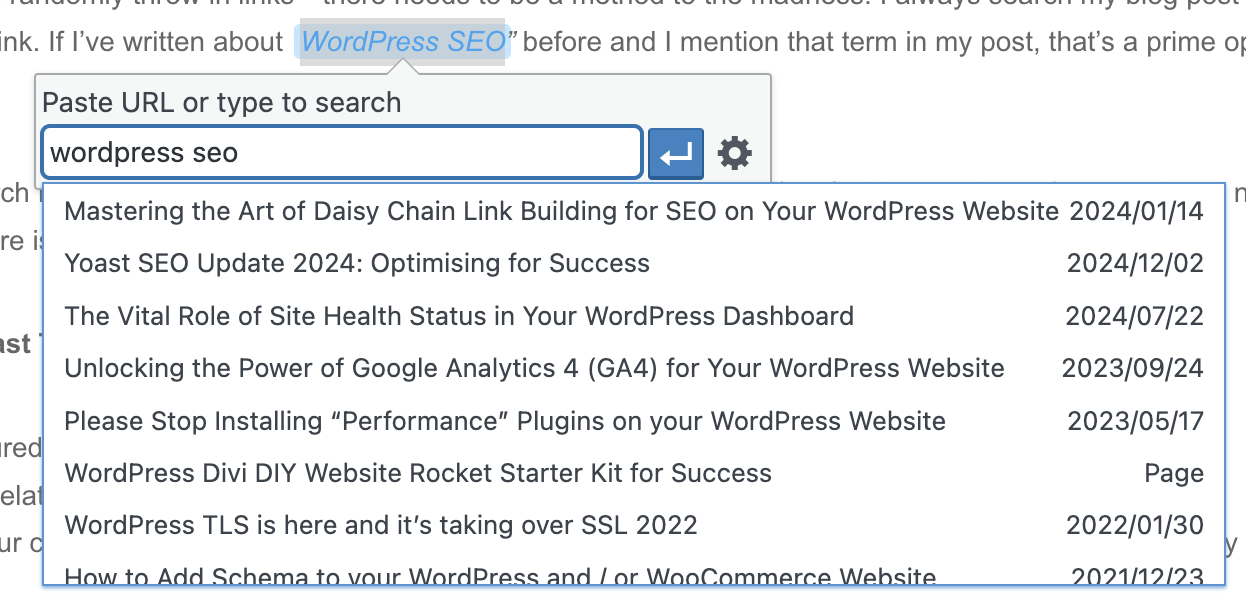
Tip: Use the search function in your WordPress editor (Ctrl + F or Command + F) to find keywords you’ve mentioned naturally. Then when adding a link, there is a search function which will search other posts for that keyword. It’s the little magnifying glass.
2. Include at Least Two Internal Links Per Post
For a well-structured internal linking strategy, aim for at least two internal links per blog post:
- One linking to a related post or page (e.g., another blog post, a service page, or a case study).
- One linking to your contact page—because let’s face it, if someone is ready to reach out, you want to make it as easy as possible!
3. Ensure the Links Are Contextually Relevant
Google pays attention to anchor text, so avoid generic phrases like “click here.” Instead, use natural, descriptive text that relates to the content you’re linking to.
For example, instead of:
“Learn more about our services [click here].” ->> Try: “Check out our WordPress SEO services to improve your site’s rankings.”
4. Update Older Blog Posts with New Links
Your blog isn’t static—every time you publish a new post, go back and add links to it from older, relevant articles. This helps keep your site fresh and interlinked.
In a Very Nice Conclusion…
Internal linking is an essential (and often overlooked) SEO strategy that can make a real difference in your WordPress Blog’s performance (actually what WordPress was invented for in the first place!). By ensuring your links are relevant, natural, and well-placed, you’ll help both search engines and readers navigate your content effectively.
So, next time you write a blog post, take a moment to search for relevant terms, add at least two internal links, and make sure there’s method behind the madness!
Need help optimising your blog for SEO? Get in touch with today! (Though I’ll leave you to figure out how!)
…